




Remember the Siemens We Can Change the World Challenge that you read about in the Engage activity? In this Evaluate activity, Meeting the Challenge, you will be working with your team to prepare an application for that challenge. Your application will be based on the design you created. You will not have to submit the application to the challenge if you do not want to. Some of you may have come up with a great idea, however. You can use this activity to get your application ready to submit. Materials
-
To learn about the application to the Siemens We Can Change the World Challenge, go to this link.
Read through the parts of the application. -
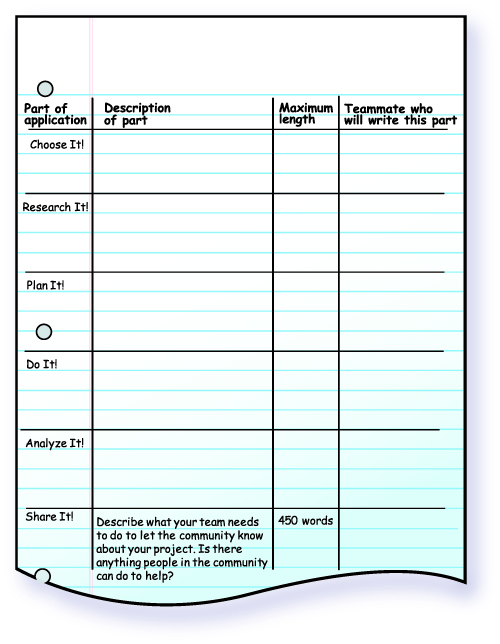
Summarize what you will need to do for each part of the application using a table like the one in figure 4-9. Read the description on the website, then fill in the second column using your own words. Note that the Share It! description has been changed and is filled in for you. Write the maximum length in the third column.
-
Each member of the team will work on 2 parts of the application. Decide amongst your teammates which parts each member will work on. List the name of the person who will work on each part in the last column of the table. Put a star in the table next to the 2 parts you will work on.
-
With your team, discuss what should be included in each part. Make notes about the 2 parts you will be writing.
-
Decide on a timeline for having your parts complete. Write the application due date in your technology notebook. On that date, combine all 6 parts into one application.
-
Turn in your completed application as your teacher directs.
-
Your teacher will return your application to you. By yourself, make revisions to the application. Your teacher may give you more instructions about this step. Do not discuss your revisions with your teammates. Your revisions will show your knowledge and understanding about the project. Hint
-
At the end of your application, write a few sentences to describe the work each team member did to complete this activity. Include information about any successes or challenges your team faced. Hint
-
Add a cover sheet with a paragraph that introduces your project. This introduction should
- explain the relationships between technology and environmental issues
- describe why the Siemens We Can Change the World Challenge is important
- include a brief statement of the environmental issue you are addressing and the technology you designed. Hint
-
Turn in your revisions and paragraphs as your teacher directs.
Activity Overview
Students have completed their designs and testing and should now share their results according to the process of technology design. To do this, they will complete an application for the Siemens We Can Change the World Challenge. They will complete the application as a team, then make any needed revisions as individuals.
Before You Teach
Materials
For each team of 3 students:
- computer with Internet access
- pens or pencils of different colors
Advance Preparation
If necessary, reserve the computer lab or computer cart. Decide whether you would like students to type or write their applications. If you decide to have them write their applications, consider deciding on a page limit for each section. On the Siemens We Can Change the World Challenge website, each section is given a word limit. If students are typing the parts of the application, they can use the word count feature of the word processing program. If they are handwriting their parts of the application, it may be easier to set a paragraph or page limit for the sections. Be sure to share those limits with students before Step 2.
As part of the application description on the challenge website, students are allowed to submit videos or presentations along with their applications. Decide whether you will allow students to submit these items and consider any guidelines you would like to give them regarding these files.
If you would like to have students submit their applications to the Siemens Challenge, be sure that you have read all parts of the website carefully to be sure all of the detailed instructions are followed.
As You Teach
Outcomes and Indicators of Success
By the end of this activity, students will
-
share their design addressing an environmental solution.
They will share their design by completing an application to the Siemens We Can Change the World Challenge.
-
demonstrate their understanding of the process of technology design.
They will show their understanding by
- contributing to their team’s application for the challenge
- editing the team application.
Strategies
Getting Started
Have students look at the Chapter Organizer. Have them describe all they have learned during the chapter. Then remind students of the Siemens Challenge finalists they read about in the Engage activity. Ask them to summarize how they have designed a solution based on the process of technology design.
Process and Procedure
-
Students should access the website that describes the application for the Siemens We Can Change the World Challenge. Allow them time to read through the parts of the application. Ask if they recognize anything about the application parts. They should see the similarity to the process of technology design.
-
Students should draw a table like the one in figure 4-9. Have them use an entire page for the table so they have enough room to write. They should then complete the table to summarize the different parts of the application.
Students will need to prepare the application for submission as specified on the website whether or not they decide to actually submit.
You will need to decide how you would like students to submit their applications—either electronically or in writing. Either way, they will need to stay within the application guidelines for the length of each part. If they are handwriting them, you may need to offer tips about how many words comprise a typical paragraph to help them avoid counting each word. If they are using a word processor, you can make sure they know about the word count feature.
-
Teams will discuss which parts of the application each team member will complete. They should make a note in their technology notebooks about which sections they will be writing.
-
The teams should continue discussing the parts of the application. They should decide some of the general information that should be in each section of the application. Students need to take notes on the parts they will be writing to ensure they represent the team discussion well.
-
Provide the students with any important dates, such as the due date, so that they can include those in their timeline and know when they will have to have their parts ready to assemble.
-
Once teams have put the parts of the application together, they should turn in their completed applications.
-
Return the team applications to the students, either electronically or in hard copy, depending on how they were submitted. Revisions on hard copy should be made by hand with a colored pencil. Decide how you would like students to show their revisions to the electronic file; this can often be done easily using the application’s “track changes” function, which will allow you to see the changes the student made to the file.
Each student should work individually to revise the application. In deciding what to revise, you might suggest that they pretend that they are now an editor who is looking over the application before submitting it to Siemens. They need to ensure that everything is described clearly and accurately and includes all the needed information. They should include more than just spelling and punctuation corrections. By making revisions to the application, it will show you what understanding students have of their design, the environmental issue, and the process of technology design. This offers you an opportunity to individually assess students on their understanding.
-
At the end of the application, or on a separate piece of paper, students should write what each team member contributed as well as the successes or challenges the team faced. In addition to the application itself, this allows you to evaluate the team’s work on the project.
-
Students add a cover sheet that introduces their application. They should first describe the relationship between environmental concerns and technology. At the very least, students should recognize that environmental concerns can be addressed by technology. They might add that no perfect technology solution is possible and that it is likely the environmental issue cannot be fully addressed with one solution. Technology may also cause additional problems due to environmental issues that may arise. One example is the technology of plastic bags, which helps people carry items around easily but which has created a great deal more trash. Students should also include why they feel the Siemens Challenge is important, as well as a summary statement about the issue they were addressing and the technology they developed.
-
Collect student work. You should have both the revised applications from each student as well as the 2 paragraphs they wrote in Steps 8 and 9.