








The creators of the ADA worked to make sure that people with disabilities have the same rights as people without disabilities. Even though people with disabilities face challenges in their lives, they are able to do many of the things that people without special needs can do. But sometimes people with disabilities require technology to help them perform their daily activities. What are some examples of technologies that might help such a person? Can you see anything in figure 4-2 that might help a person with a disability?
In this Engage activity, What’s the Problem?, you will work to decide on a technology that you could design to help a person with a disability. You will use the process of technology design to create a solution as you work through the chapter. Materials
Imagine that a new student is joining your class. You know that the student has a disability, but you do not know what it is. Write a paragraph to describe the following:
- Explain how you feel about the student joining the class.
- Imagine how you think the student feels about joining the class. Hint
Make a two-column table in your technology notebook like the one in figure 4-3. The left column already has examples of disabilities. In the right column, add ideas about technologies that you think might help people with these disabilities perform their everyday activities. Hint
Figure 4-3: Draw a table like this one in your technology notebook. Fill in the right column with ideas about technologies that you think might help people with the disabilities in the left column.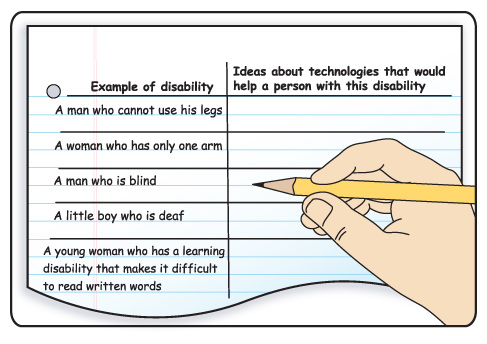
In Step 2, did you list anything that might be part of a building, such as a ramp or handrails? The ADA has specific guidelines about how buildings must be designed. Learning about some of these guidelines will assist you in thinking about what might help a person with a disability. Using the ADA Design Checklist, look at different features of your school and make notes about how well you think the school meets the guidelines in the checklist. Hint
In this chapter, you will design a technology to help someone with a disability. You will work through the entire process of technology design. Refer to the graphic of the process in figure 4-4.
- At which stage will you begin the process?
- Which stage do you think will be the most interesting? Why?
- Which stage do you think will be the most difficult? Why?
Work with your team to identify the problem you want to solve in this chapter. Use Steps 5a–5c to help you identify the problem.
- Choose the type of disability that you want to address.
- Identify everyday tasks that might be difficult for a person with that disability to perform. These tasks represent possible problems for your technology design.
- Come to a consensus about which problem your team wants to solve with the technology it designs. Choose a problem that would be reasonable for a team of middle school students to solve. Hint
In your technology notebook, write down the problem your team has decided to work on. Draw a box around it using a different-colored pen or pencil. This will be your focus during the rest of the chapter.

Activity Overview
In the Engage activity, What’s the Problem?, students will use a checklist that shows some of the guidelines from the Americans with Disabilities Act (ADA) to evaluate features around the school. They will think about the difficulties that people with disabilities might face when doing some everyday tasks. They will then choose a disability to serve as the focus of their work in this chapter. They will decide on a problem for which they would like to develop a solution.
Before You Teach
Background Information
The ADA is a law that the U.S. Congress enacted in 1990. It provides protections to individuals with disabilities that are similar to the protections provided to individuals on the basis of their race, gender, national origin, age, or religion. The act prohibits discrimination against people with disabilities. It also guarantees equal opportunities for people with disabilities regarding access to public places, transportation, employment, and government services.
The ADA defines a disability as “a physical or mental impairment that substantially limits a major life activity.” In 2008, examples of “major life activities” were added to the ADA. These include, but are not limited to, “caring for oneself, performing manual tasks, seeing, hearing, eating, sleeping, walking, standing, lifting, bending, speaking, breathing, learning, reading, concentrating, thinking, communicating, and working” as well as the operation of several specified “major bodily functions.”
Materials
For each team of 3 students:
- 3 copies of Master 4-1, ADA Design Checklist
- measuring tape or meterstick
- pens or pencils of different colors
- paper clips or sticky notes (optional)
Advance Preparation
Make 30 copies of Master 4-1, ADA Design Checklist. Go through the checklist at your school so you know which guidelines your school meets, as well as the locations of the features on the list. This will help you support your students if they are having trouble. It will also allow you to determine if you can limit the area where students can go as they complete the checklist.
You might also want to make a large version of the process of technology design graphic. Students will be working through all the stages during this chapter, and it might help to have a poster of the graphic on the wall so that you can refer to it often.
In Step 2 of the Engage activity, there is an option for you to hand out copies of the table rather than having students copy it into their technology notebooks. Decide if you would like to hand out the table and make any copies you need.
As You Teach
Outcomes and Indicators of Success
By the end of this activity, students will
-
begin thinking about how technology might help a person with a disability.
They will show their thinking by
- listing ideas about how technologies might help people with specific disabilities
- evaluating features in the school to see if they meet ADA guidelines
- choosing a problem for which they will come up with a solution to help a person with a disability.
-
begin to feel empathy toward people with disabilities.
They will show their empathy by
- describing how they feel about a new student who has a disability and is joining their class
- describing how they think a student with a disability would feel about joining their class
- explaining whether they think it is valuable to create technologies that benefit only a small group of people.
-
demonstrate their ability to use the process of technology design.
They will show their ability by completing the first stage of the process, “identifying the problem.”
Strategies
Getting Started
Read the introduction to the activity. Have students answer the questions posed by first listing technologies that might help a person with a disability. Students might come up with ideas such as a wheelchair, crutches, and hearing aids. Then, have them look at the picture (figure 4-2) and identify features that might help a person with a disability. The bumps indicate to people who are blind that they are about to step into the road. The different color might also help people who have a visual impairment. Explain that in this activity, students will be working to identify a way to help solve a problem for a person with a disability.
Process and Procedure
Read Step 1 with students. Before they begin writing their paragraphs, make sure they have read the hint. It is important for them to realize that they should not say anything that would hurt other people. They should remember this through the whole chapter, both in their class and team discussions and in their writing. Then, give them time to write their paragraphs. They should address both how they feel about the student joining the class and how they think the student feels. Make sure they realize that it is okay to feel nervous or scared about the student joining the class. Be sure they understand that the hint is referring to “mean” or offensive comments, not to comments about feeling nervous or scared. Answering this question helps students with the skill of seeing other people’s points of view.
Have students copy the table in figure 4-3. If you think this task will take them too long, you might wish to recreate the table and make copies of it so they can tape or glue it into their technology notebooks. Encourage them to think of several technologies for each situation. You can also encourage them to be creative and think of technologies that might not yet be invented. Brainstorming about new ideas may help them later in the activity as they decide on a technology that they will create in this chapter.
Step 3 has students evaluate the school building according to ADA guidelines. This is not a complete list of guidelines; rather, it provides a few selected features that should be interesting to your students. Distribute measuring tapes or metersticks so that students will be able to measure the features in the school. This step helps them think about different technologies so they have ideas when they decide what technology they will create. Because they will need to leave the classroom for this step, you may wish to have them work in teams. They will be working in teams of three throughout the rest of the chapter. It is a good idea to assign those teams at this point.
Because this capstone chapter has students going through the entire process of technology design, Step 4 has them think about this process. They should realize that they need to identify the problem to start the process. They will have different ideas about which steps will be the most interesting and which steps will be the most difficult. Accept any answers and explanations that are reasonable. Having students relate their own feelings and ideas about what they will be doing helps increase their motivation.
Teams of three should work together to determine what problem to solve in this chapter. Make sure that students are following the steps of first thinking about the disability they want to address, and then identifying tasks. They will likely have thought of some technologies and will want to jump straight to them. Remind them that they are trying to come up with new technologies (or a new way of designing an already developed technology) and they need to begin with the problem, not an existing technology. They will come up with ideas on solving the problem in the next activity, so try to limit them to just the disability and the problem at this point.
All students should write the problem that the team decided to work on in their own technology notebooks. Have them draw a box around the problem with a different- colored pen or pencil. You might also have them put something like a paper clip or a sticky note on the page so they can easily find it and refer back to the problem.