






In the Explore activity, your team made decisions about materials for a model house. Your goal was to build the house that best stood up to the wind. In this case, the paper, tape, glue, fan, and other materials were examples of technology—they were helping you solve a problem. In the Explain activity, you continued thinking about choices, including the benefits and the costs related to choices.
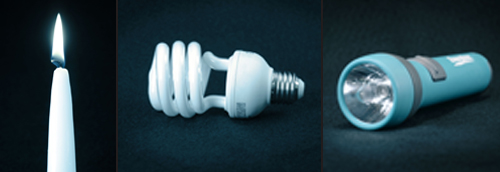
Look at the objects in figure 4-12. These are examples of technologies that people have developed. What problems do these objects help solve?
In this Elaborate activity, Designer’s Dilemma, you will continue to think about the benefits and costs related to design choices. Why do certain objects look the way they do? Which decisions did the designers have to make when they designed certain technologies? Materials
-
Set up your technology notebook for a new activity.
-
Retrieve the object that your teacher assigns to your team.
-
Pass the object around to each person on the team. Make sure you know what the object is, and then make some observations about it. Once everyone has studied the object, place it in the center of the table.
-
Read each of the questions below and have each member of the team provide an answer. Hint
- What is the purpose of this object?
- Does the object solve any problems? If so, which ones?
- What year do you think the object was developed?
- Why do you think the designer chose this material? Would the object still work if it were made of a different material? Explain why or why not, noting at least one different material.
- How do you think the designer decided on the size of the object? Is size important in how the object works?
- Where would someone use this object? Did the designer think about this for the design?
- How much could you change the shape of the object and still have it do the same job?
- Would the object serve the same function if it were another color?
- How would you change the structure of the object so that a small child could use it?
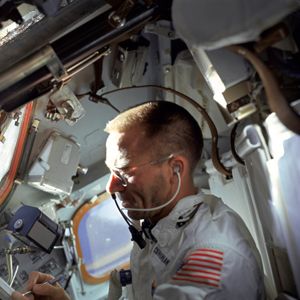
- Suppose NASA decided to use the object on a space mission. (See figure 4-13.)The object would need to work in space, where the force of gravity is minimal. How would you change the design of the object so that people could use it in space?
-
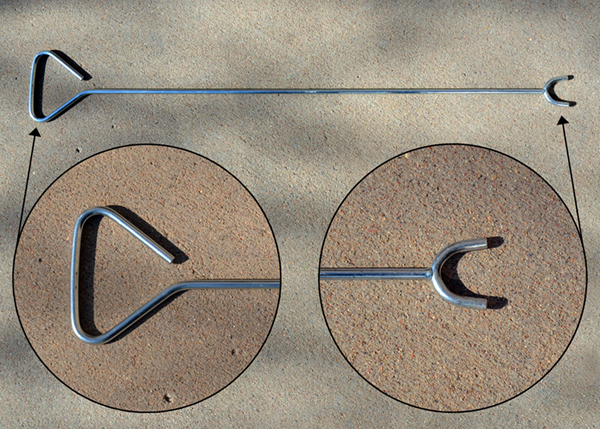
Look at the object pictured in figure 4-14. Discuss the following questions with your teammates. Which decisions were made when this object was designed? Based on what you can tell from the photograph, can you guess what the object is used for? Hint
-
Be prepared to share your ideas about the object’s function, and your reasons, with the class.
Activity Overview
The Elaborate activity, Designer’s Dilemma, asks students to consider factors that designers think about when designing a technological solution to a problem. As they consider these factors, students will identify the benefits and costs that may be associated with different decisions.
Before You Teach
Materials
For each team of 3 students:
- 1 common object that solves a technological problem (see Advance Preparation)
Advance Preparation
Gather 10 common objects such as scissors (taped shut), a stapler (with staples removed), paper, sunglasses, a coaster, a paper cup, a new toothbrush, a small bottle of shampoo, a measuring cup, a key, or any other object that is available. Try to collect enough objects so that each team will have a different object. Students will already know the function of these objects, but they may not have considered them to be a technology before.
As You Teach
Outcomes and Indicators of Success
By the end of this activity, students will understand that common objects provide examples of technological problem solving.
They will show their understanding by
- describing which features of the object must remain unchanged for the object to serve a useful function
- speculating on how an object’s use would change if it were made in another color or size, or from a different material
- recognizing that the designer made decisions during the development process.
Strategies
Getting Started
Have students look at the chapter organizer and determine what they have learned so far in the chapter. Ask them to read the introductory text at the beginning of this Elaborate activity.
Process and Procedure
Allow a few minutes for students to set up their technology notebooks for the new activity.
- Students should work in teams of three to examine an object that you will provide. Give each team a different object. Students will use a series of questions to help them think about decisions that the designer had to make when creating the object.
Students will continue to work in their teams to study an unfamiliar item. (See figure 4-14.) Their task is to determine why the object was designed in a certain way and whether the design provides clues about its function. They should use the questions in Step 4 to help guide their discussion. It is not important that they know the correct function of the mystery item. Rather, they should look for clues that the design provides about the object’s function. Wrap up the activity by holding a class discussion. Ask teams to share their ideas about the mystery object and to consider features of the design to justify their ideas. After all teams have shared their ideas, have the class vote on what they believe is the most likely function of the object.
The mystery item is most likely unfamiliar to most students. It is actually a tool designed for use with a lawn sprinkler system. The tool is used to turn on and turn off a valve underground. The prongs on the end of the tool fit around the valve and allow the user to rotate the valve to turn the water supply on or off.