







You did great work in the Explain activity by helping ABC Water and Space choose a new product line. Because of that work, Donald Ablestein has hired you for another project. This time, you will be working in the space division. As you work through this Elaborate activity, Rocketing to the Top, you will continue thinking about how to run fair tests. You will also learn more about how testing different parts of a design can help make a product better. Materials
-
Read the latest letter from Donald Ablestein to learn more about what you will do in this activity.
Letter
Class,
I really appreciate your hard work helping us choose our new product line for the boats. You did such a good job with fair tests that I have a new challenge for you. We are designing a new rocket for our space division. We want to make a rocket that can go as high in the air as it can. It should also fly as straight as possible.
Figure 3-8: These astronauts use simulators to help them practice for their work on missions. The engineers who build space shuttles also use simulators to help them with their designs.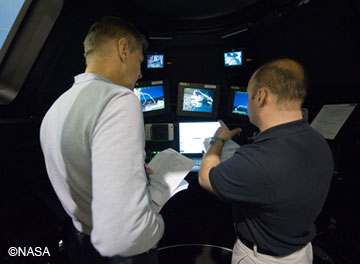
I am giving you access to one of our simulators (see figure 3-8). This simulator will help you do some of your initial tests for the rocket design. In it, you will be able to test the length of the rocket body, the number of fins, and whether or not to put a nose cone on the new rocket. See figure 3-9 to help you understand what these parts are. You should work to find the best possible combination of these three parts to make the rocket fly high and straight in the air.
Figure 3-9: This rocket shows the parts you will be testing. Before you begin working with the simulator, make sure you know where the nose cone, the rocket body, and the fins are located.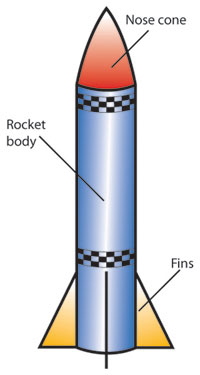
Be sure you are doing fair tests on the rocket parts!
Best regards,
Donald
-
Spend a few minutes working with the simulator to see how it works. You should try
- adding and removing a nose cone
- changing the length of the rocket body
- adding and removing fins
- launching the rocket.
You and your partner should each have a chance to run the simulation.
-
Work with your partner to design a fair test to determine whether the rocket should have a nose cone like the rocket in figure 3-10. It may help you to look back at the questions on the Fair Test Checklist 2 master from the Explain activity. Draw a data table in your technology notebook to record the results of the test. Hint
Figure 3-10: The nose cone on a rocket affects how well it flies. Use the simulator to determine whether the rocket should have a nose cone.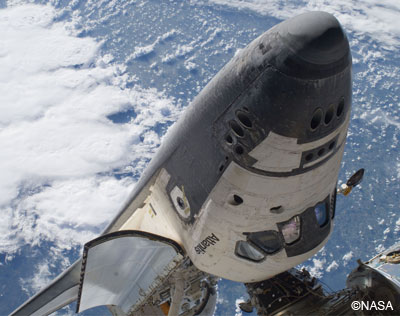
Use the simulator to carry out the nose cone test. Be sure to record the data in your data table.
Work with your partner to design a fair test to determine how long the rocket body should be. Draw a data table in your technology notebook to record the results of this test. Hint
Use the simulator to carry out the body length test. Be sure to record the data in your data table.
-
Work with your partner to design a fair test for the number of fins the rocket should have. (See figure 3-11.) The rocket can have from 0 to 4 fins. Draw a data table in your technology notebook to record the results of this test. Hint
Figure 3-11: The fins on a rocket affect how well it flies. Use the simulator to determine whether the rocket should have fins and, if so, how many.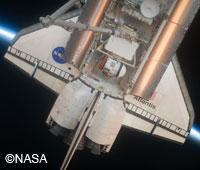
-
Use the simulator to carry out the fin test. Be sure to record the data in your data table.
-
Based on the tests, what do you think would be the best conditions for the rocket? You may want to run a few more tests to confirm your results.
-
Make some notes that will help you tell Donald Ablestein about the results of the tests. Add any information that will help you remember how you made the tests fair. Hint
Activity Overview
In this Elaborate activity, Rocketing to the Top, students will continue their work for Donald Ablestein, this time in the space division of the fictitious company. They will use a computer-based, interactive simulation to determine the best combination of parts for a rocket.
Before You Teach
Background Information
Science and technology classes often use models as a way to help students visualize phenomena that are difficult to understand. One type of model is a computer-based simulation such as the one students will use in this activity. Sometimes teachers present models to students but do not have students analyze those models. It is important for students to realize what aspects of the real work the model represents. It is also important for them to think about the strengths and limitations of the model.
Rockets are an interesting topic to many students. Rockets are designed to fly as high and as straight in the air as possible. One feature of a rocket’s design is the nose cone. A nose cone cuts down on drag and makes the rocket more aerodynamic. A second rocket design feature is body length. In the simulation students will see that a longer body allows the rocket to be more stable. Although there is a limit to effective body length, the details of this limitation are beyond the scope of this activity. The body lengths from which students can choose are all fixed and reasonable. A third rocket design is the number and spacing of fins. Fins provide stability and help the rocket fly straight. Unevenly spaced fins will cause the rocket to fly to one side rather than straight in the air. In the simulation students are limited on the positioning of the fins, so they will see that two fins or four fins work best for providing stability and helping the rocket fly straight in the air. A Reflect and Connect question has them think about three fins that are evenly spaced. By the end of the activity, they should realize that the stability provided by fins relates more to positioning than to a specific number. Based on each of these design features, the rockets that should fly the highest and the straightest will be those with a nose cone, a longer body, and evenly spaced fins.
As with any experiment, the results can vary. When testing an actual rocket, factors that can affect a rocket’s flight from one test to another include weather and/or wind changes, slightly different amounts of fuel used, undetected changes to the rocket’s body, and so on. Classroom tests can vary from one time to the next due to other factors, such as damage to the rocket model, parts of the rocket getting wet, differing sizes of the pieces of fizzing tablets, and so on. This is important to keep in mind as students reach the Evaluate activity and build actual rockets based on their work with the simulator in this activity.
Materials
For each class of 30 students, teams of 2:
- access to the Rocketing to the Top simulation on 15 computers
- 1 copy of the letter in Step 1
Advance Preparation
Students will probably need access to the computers for two class periods to complete this activity. Make sure you have reserved computers or the computer lab in advance, if necessary.
Again, the activity begins with a letter from the president of a fictitious company, and again you may wish to begin class by opening an envelope, then reading the scenario. If so, you will want to place a copy of the letter in an envelope before the start of class.
As You Teach
Outcomes and Indicators of Success
By the end of this activity, students will
-
further their understanding of fair tests.
They will show their understanding by
- designing and conducting fair tests on the different parts of a rocket
- writing a letter to explain how the tests were fair
- describing how the Process and Procedure steps relate to a fair test.
-
understand the strengths and limitations of using models.
They will show their understanding by
- describing how the simulation relates to real rockets
- analyzing the strengths and limitations of the simulation model.
-
gain experience using computer-based simulations.
They will show their experience by conducting tests on the different parts of the rocket using the simulator.
Strategies
Getting Started
Have students review the key ideas they have already learned and what they will be learning in the chapter organizer. If you started the Explain activity by opening an envelope and reading Donald Ablestein’s letter aloud, you might want to do the same for this activity.
Process and Procedure
-
Read Donald Ablestein’s letter aloud to the class, or have students read the letter on their own.
-
Allow students time to get used to the simulator. They should complete each task listed in Step 2. This will let students see how the simulator works before they begin the testing. It also will help the testing process go faster, as students will not have to learn the simulator at the same time. Make sure that both students on the team have a chance to work at the computer.
-
Depending on your students, you can decide whether they can continue working from here to the end of the activity on their own or whether you need to stop them every step or two. In Step 3, students should work with a partner to design a fair test to determine if the rocket should have a nose cone. Remind them of the information in the hint that the goal is to make a rocket that flies as high and straight as possible. They should use this information as they determine whether the rocket should have a nose cone. Make sure they draw their data tables before they continue on to the next step.
-
Circulate around the room as students use the simulator to carry out the test for the nose cone. Ensure that at this point students are only testing the single variable of the nose cone. You may want to ask students to explain the test to you. Look for evidence of them understanding the independent and dependent variables, as well as the idea that they should run more than one test on the same conditions to verify the results. Students should use an average of the results for each set of conditions as they consider how they would build the rocket.
-
Allow students time to work with their partners to design a test about the length of the rocket body. Students should read the hint to help them focus on the tasks. Be sure that they draw a data table for this test before moving on to the next step.
-
Circulate around the room as students begin the test for the length of the rocket body. Make sure they are only testing one variable as they work. You may wish to discuss with students whether they should have a nose cone on the simulator rocket at this point. Students should have found in the last test that the nose cone helps the rocket go higher, so they will want to have a nose cone on the rocket as they run the test for body length. In this test, students should find that the longest rocket body allows the rocket to fly the highest in the air.
-
In Step 7, students should design the final test. This test relates to the number of fins the rocket should have. They should test 0, 1, 2, 3, and 4 fins on the rocket to see the results.
-
As students begin the tests for the number of fins, they should think about whether the nose cone should be on the rocket and how long the body should be. They will find that 2 or 4 fins work best, with 1 and 3 fins causing the rocket to go to the side. Two or 4 fins provide more stability than no fins. Four fins work the best. If students finish early, have them move on to Step 9.
-
Have students conduct some additional tests to confirm the results. For example, if they found 4 fins work the best, they might try removing the nose cone, but keeping the body length long and the 4 fins in place. They might also keep the nose cone and the 4 fins in place, but use the shortest body length. These additional tests will provide them with more evidence for the results. In the end, students should be able to confirm that the best conditions for the rocket are having a nose cone, a long body, and 4 fins.
-
In Step 10, students should make some notes that will help them explain to Donald Ablestein what they have done. In the Evaluate activity, they will write him a letter about the tests and how the rocket should be designed, using information from this activity and the Evaluate activity. They should be sure to address each of the three parts that they tested, as mentioned in the hint, and to explain what made these tests fair.