








Technology is a part of almost everything we do or see. You use technology every day. But what is technology? What does that word mean to you? Can you find examples of technology in your classroom?
Look at each image in figure 4. Think about whether each picture represents technology. Why do you think each picture does or does not show technology? In this Engage activity, you will think more about technology. Materials

Start a new entry in your technology notebook. To do this, turn to a new page. Then, write the date and the name of the activity. Add the activity to your table of contents.
On your own, answer the questions in the introduction to this activity. Hint
-
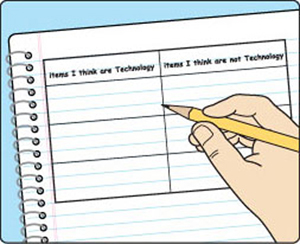 Figure 5: Create a table like this one in your technology notebook. Tables can help you keep your information organized. When you get to other activities, this table will also help you remember which items you thought were technology.
Obtain a set of What Is Technology? cards from your teacher. Work with your partner to divide the cards into two piles. One pile should contain the cards that you think represent technology. The other pile should contain the cards that you think do not represent technology. Hint
-
In your technology notebook, create a two-column table like the one in figure 5. Write the headings “Items I think are technology” and “Items I think are not technology” at the top of the columns. Fill in the table using the items in your two piles. Hint
If you need to, revise the answers you wrote in Step 2. Hint
Read your answers to your partner. Each of you should read what you wrote. Work together to come up with a team definition of technology.
Write your team’s definition on a large sheet of paper with a marker. When you finish, post the paper on a wall so that everyone in the class can see the definition.
Participate in a class discussion. Be ready to share your ideas about all the definitions. Hint
Activity Overview
In the Engage activity, students will receive cards with the names of different items on them. They will divide the cards into two groups showing those items that they think are technology and those that they think are not technology.
Before You Teach
Background Information
When people hear the word technology, many think only of electronic items such as computers, cell phones, or MP3 players. In fact, technology is anything that helps make our lives easier or more efficient. Technology extends the limits of human capabilities. Do not at this point tell students what technology is. Engage activities are designed to allow students to share any ideas they have about what you are going to teach. You are not seeking right or wrong answers, but rather an overall view of students’ conceptual knowledge of the subject.
Materials
For each class of 30 students:
- 15 sets of What Is Technology? cards
- pens or pencils of various colors
- 1 large sheet of paper, such as legal-size paper, chart paper, or butcher paper
- markers
- 30 sticky notes or pieces of colored tape (optional)
Advance Preparation
Make copies of Master DT-1, What Is Technology? cards. You may wish to laminate the card sets for later use. Cut the cards apart to make individual card sets for 15 teams of two students.
Decide how you will use the online module in class. If you plan to project the steps, be sure that you are able to log in and are familiar with the navigation through the chapter. If you plan to have students work on computers, make sure you have log in information for them. Plan to help them through the navigation of the module. Reserve a computer lab or computer cart if necessary.
As You Teach
Outcomes and Indicators of Success
By the end of this activity, students will
-
reveal their ideas about items that represent technology and items that do not represent technology.
They will show their current understanding by
- dividing items into one of two categories
- creating a list in their technology notebooks
- describing why items match or do not match their definitions of technology.
-
construct a definition of technology.
They will show their ideas by
- writing a definition of technology
- comparing their ideas with the ideas of their teammates and classmates
- describing similarities and differences between teams’ definitions.
-
consider the importance of teamwork.
They will show their consideration by
- describing how working with a team was helpful
- sharing ideas about why people who do technology might work on a team.
-
reflect on the phases of the BSCS 5E Instructional Model.
They will show their reflection by describing what they did in the activity that matches the goals of an Engage activity.
Strategies
Getting Started
Make sure that students have read the introduction to the chapter. It provides information about the tools and resources that will help them be successful in this chapter, and they should gain a basic idea of the reason behind using each item.
Next, go through the chapter organizer with students. This is an important pathway for students’ learning. It shows the key concepts for each activity along with linking questions that help students understand how the activities are connected.
Have students read the introduction to the activity. Pose each of the questions in the introduction to students. Because this is an Engage activity, students have an opportunity to share their ideas. There should not be any judgment of their ideas. They should not be told if their answers are right or wrong. Emphasize that this activity will help students begin to develop their ideas about technology. This means they will not have a complete understanding at the end of the activity but will have just begun to express their ideas. Tell students that you do not expect them to have the right answers as they go through this activity, but rather that they should begin thinking about the concept of technology and what they already know about it.
Process and Procedure
-
Because the technology notebook is an important part of this program, the first few activities include steps to help students set up their technology notebooks. Step 1 serves this purpose. The step instructs them to include basic information about the title of the activity and date, and to create a table of contents. You may need to give students additional information about setting up a table of contents and then skipping a few pages before beginning the first activity. You may also add any other information you wish your students to use as they set up their technology notebooks.
-
In Step 2, students describe what they already know about technology. Remind students that they should be thinking about their answers and writing down their best ideas, even if they do not believe they have complete answers. Convey to students that there are no right or wrong answers at this stage of their learning, but that they should list their best ideas. The hint behind the link gives students ideas about what they might write in their answers. Hints help students answer questions or complete the tasks in a step. Although the TE does not always specifically instruct you to read the hints, it is a good habit to always click on them and have students read the information.
-
Divide students into teams of two for Step 3. Provide each team with a set of cards created from master DT-1, What Is Technology? cards. (See Advance Preparation.) Students should take about 10 minutes to divide the cards into two piles. One pile should show the items they think represent technology, while the other pile should show the items they think do not represent technology. Be sure students read the hint. Encourage them to offer their best ideas but explain that they need to place every card into one pile or the other. All items in the set of cards represent technology because they are all solutions that help humans expand their limits. However, students will likely not realize that at this point. Accept any division of the cards as long as students put each item into one pile or the other.
-
Have students examine figure 5 to see the type of table they should create in their technology notebooks. You may need to remind them to create a table big enough so that they will be able to include all their cards in the lists. Once students have drawn the table, have them fill it in based on their work with the cards. If there were any disagreements between partners about where to place an item, individually students may place that item where they think it belongs rather than where they decided to place it while working with their partner. You might have students mark this page with a sticky note or piece of colored tape, as they will need to refer back to the table during the Elaborate activity.
-
In Step 5, have students revise the answers they wrote in Step 2. Be sure students read the hint and have them make any revisions with a different-colored pen or pencil. You might also ask them to draw only a single line through the words they are changing so they can still be read later. Revising is an important metacognitive strategy that is used throughout the module. It helps students understand how much they have learned and how their ideas have developed over time. Students should understand that they will have opportunities to further develop their answers from Engage activities as more information becomes available to them. By making changes in a different color, students are also better able to keep track of what they have learned during a chapter or module. Students are often reluctant to revise their work. Try to emphasize that this is an important part of learning and that the answer may have been right the first time, but that students may have thought of some new ideas to add to their work. Beginning this process early in the program will help students become accustomed to the idea of changing their ideas as they learn new information. Be sure to give students enough time to revise so that they realize it is something you expect them to do.
- Have students read their answers to
their partners, then work together to develop a definition of
technology. You may wish to encourage them to write a rough draft
of the definition in their technology notebooks so that they can
revise it before writing the final definition. Once they have
finished the definitions, have each team write its definition on
a large sheet of paper using a marker so that it can be seen
easily. Teams should include teammates’ names or team names on
their definitions. You can use legal-size paper, butcher paper,
or chart paper for the definitions. Alternatively, if you have
access to a printer, you can have students print their
definitions in a large font. Post the definitions on the wall. If
you are able, leave them posted through the remainder of the
chapter. If you will not be able to leave them posted, be sure
students have a record in their technology notebooks of their
final definitions. They will use the definitions again in later
activities.
-
Allow students a couple of minutes to read the other definitions from the class. You may wish to hold a “gallery walk” once all the definitions are posted. Then hold a class discussion. Ask students what similarities and differences they saw between the definitions. You might also ask if there is anything they saw in every definition or if there are any new ideas they have thought of because of the other teams’ definitions. Remember that this is an Engage activity, so encourage students to write their best ideas. If you come across misconceptions during this activity, simply note them to yourself and address them at the end of the chapter.