






Since you started this chapter, have your ideas about technology changed? You have learned what it means to do technology. You have also learned about the steps in the process of doing technology. You explored some of the safety issues related to technology. Now it is time to show what you have learned!
In this Evaluate activity, you will use an example to show what you know about technology. You will then create a visual to display in the class. Materials
-
Look back at the two-column table you created in Step 4 of the Engage activity. Revise the table if you have changed your ideas about whether some of the items are or are not technology. Make your revisions with a different-colored pen or pencil. Hint
-
Choose one item from your technology list to use as an example on your visual. You might want to choose an item that you did not think of as technology during the Engage activity, but now do.
-
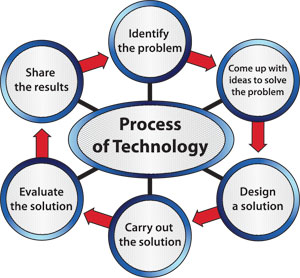 Figure 19: The process of technology. Think about what an engineer might have had to do at each stage to design your technology.
To prepare for your work, decide how to include the following items on your visual. You may want to make notes in your technology notebook for each item.
- Include the name of your technology. You might also want to include a picture, drawing, or sketch.
- Write a description to explain how your example is technology.
- List the stages that an engineer might have had to do to create the technology. Hint
- List any safety equipment needed for the steps you listed in Step 3c.
- Identify any other safety concerns you think the engineer might have had to consider.
-
Choose the materials to use for your presentation. Your teacher may have some materials available. If there are other materials that you would like to use, discuss them with your teacher.
-
Create your visual.
-
Present or display your visual as your teacher directs.
Activity Overview
In this Evaluate activity, students will share what they have learned about technology. They will choose one of the technologies from the What Is Technology? cards in the Engage activity. They will then use a visual presentation to describe how it matches the definition of technology. They will have to describe the steps a designer may have taken in developing the technology. Finally, they will describe safety concerns related to the technology.
Before You Teach
Background Information
All of the items listed on the What Is Technology? cards represent technology because they are all solutions that help humans expand their limits.
Materials
For each class of 30 students:
- pens or pencils of various colors
- materials for creating a visual presentation (such as poster board or chart paper and markers, or a computer with presentation software)
- several sets of What Is Technology? cards from the Engage activity (optional)
Advance Preparation
You may wish to have several sets of What Is Technology? cards available for your students to examine through as they choose a technology. The lists of technology should be written in their technology notebooks from the Engage activity, so these cards are optional.
Decide in advance how you would like students to create the visual presentations, and then obtain the necessary materials. You may wish to have students create posters on poster board or chart paper. Another option is to create a visual presentation on the computer using presentation software. Be sure you have the means to display the visual presentations.
Make sure students understand that they will be graded on the content of the visual presentation, not the looks. Students often spend too much time trying to make their projects attractive and not enough time on content. Be aware of students who will cut and paste as much information as they can onto their visual presentations, thinking they will get a better grade if they have more information.
As You Teach
Outcomes and Indicators of Success
During this activity, students will demonstrate
-
their understanding of technology.
They will show their understanding by describing why the technology they chose matches the definition of technology.
-
their understanding of the process of technology.
They will show their understanding by listing the steps taken to create the technology.
-
their understanding of the importance of safety as it relates to doing technology.
They will show their understanding by
- listing any safety equipment that the designer might need
- describing the safety concerns related to consumers that the designer had to consider.
-
their skills at communicating information.
They will demonstrate their skills by creating a visual presentation that provides information about technology.
Strategies
Getting Started
Go through the chapter organizer with students. Help them understand how far they have come in learning about technology. Ask a few of them to share something that they have learned in this chapter. Tell students that they will all have an opportunity in this activity to share everything they learned.
Process and Procedure
-
In Step 1, have students find the two-column table that they created in the Engage activity. If you had them mark the page with a sticky note or piece of tape, remind them to look for that marker. Have them revise the tables if necessary. Students should understand that they created this list at the beginning of the chapter before they learned anything about technology. They should consider each of the items again and see what they think now that they have learned more. In science and technology, we base our ideas on the information we have and, as we learn more information, it is necessary to revise our ideas.
-
Students will choose one item to use as the example for their visual presentations. Encourage them to choose an item that they thought was not technology the first time they looked at the What Is Technology? cards, although this is not a requirement for the activity. Allow them a few minutes to decide.
-
Students should create a visual presentation that shows the information in each point listed in Step 3. Reinforce that a successful visual presentation will contain information about each of the five lettered steps. At this point, prepare students for Step 6 by telling them whether they will be presenting in front of the class or displaying their work.
- Provide students with the options
for creating the visual presentation, such as computers and chart
paper/markers. Allow ample time for them to complete the visual
presentation either during class or for homework.
-
Have students present their visual to the class or display their work around the room.